
What is Forrester AI?
What is Forrester AI?
Launched in October of 2023, Forrester AI (formerly known as Izola) is our genAI tool to help you make progress on your top initiatives faster, with insights and advice from trusted Forrester research. Clients can access Forrester AI from the Forrester platform in two ways:
- Forrester AI: Use a chat interface where you can ask a question and get synthesized insights and advice across Forrester’s reports and data.
- Forrester AI for reports: Get instant summaries and converse with a specific research report using the Forrester AI panel that is seamlessly integrated into the report experience.
What is the goal of Forrester AI?
Think of Forrester AI as a shortcut and better starting point when tackling complex business problems, through a rapid synthesis of Forrester’s research, data, and insights. Forrester AI can help you quickly get up to speed on a new topic, prepare for a meeting, and validate your strategy or direction.
What makes Forrester AI different from other AI tools?
Tools matter, and how you build them matters even more. Forrester AI differs from other AI tools and public large language models (LLMs) in four important ways to deliver responsible, functional AI for everyone in your organization:
- Proprietary research and insights. Forrester experts produce proprietary research and insights based on in-depth interviews with practitioners, technology and service provider briefings, and annual data surveys of more than 500,000 respondents that span consumer behavior, customer experience, business buyer trends, and technology.
- Industry-leading. Forrester launched the Forrester AI tool, formerly named Izola, in 2023 — years ahead of industry peers. Now embedded in the Forrester platform and used by thousands of clients, Forrester AI paved the way for Forrester AI Access: the only AI-first research service powered by trusted, proprietary insights and advice.
- Actionable. Implement presentation-ready insights and advice instantly, with traceable links back to validated, original sources providing credibility, context, and confidence.
- Built for business. AI Access is optimized to provide succinct advice and concise responses. Use it to create business cases, get strategic advice, summarize reports, track trends, find vendors, and more.
- Integrated experience. Forrester AI and Forrester AI for reports are fully integrated into the Forrester client platform and research report experience.
Who has access to Forrester AI?
Forrester AI is currently available to Forrester Decisions, Forrester Market Insights, Forrester AI Access, Group Reader Access, and Reader Access Plus seatholders.
If you are a Forrester client but don’t have one of these license types, contact your Forrester account team to learn more about gaining access to Forrester AI. If you are not a Forrester client, fill out this form to learn more.
What’s the difference between Forrester AI and Forrester AI Access?
AI Access is a product offering, whereas Forrester AI is a key feature available to AI Access seatholders as well as all Forrester Decisions, Forrester Market Insights, Group Reader Access, and Reader Access Plus seatholders.
Specifically, AI Access is a level of service within the Forrester Decisions and Forrester Market Insights product portfolio. AI Access seatholders gain access to Forrester’s research, data, and webinars, with Forrester AI serving as their front door and homepage to get insights and advice backed by Forrester’s trusted research.
The new level of service provides the flexibility to expand access to Forrester’s deep insights and advice in a self-service model, without direct analyst engagement needed for everyone within an organization. Forrester AI has been proven solid, stable, and time-tested to deliver trusted advice fast, beginning in October 2023 to the present day, thanks to client innovation, feedback, and cocreation throughout the process.
How To Use Forrester AI
How should I use Forrester AI?
Use Forrester AI to make progress on your top initiatives faster with synthesized insights and advice from across Forrester’s reports and data. Here’s how:
- Ask for advice about your top initiatives.
- Get instant insights and advice from trusted research and data.
- View the source research to learn more.
- Copy answers for internal presentations.
- Rate the value of responses so we can improve.
How should I use Forrester AI for reports?
Use Forrester AI for reports to get instant summaries and converse with a specific research report. Here’s how:
- Summarize the report and get key takeaways instantly.
- Ask questions about the research.
- Jump to the source text or image.
- Copy answers for internal presentations.
- Rate the value of responses so we can improve.
What use cases is Forrester AI designed to support?
Business and technology leaders can use Forrester AI in a variety of ways to get the insights and advice they need to make progress on their top initiatives faster:
- Explain concepts: “Explain agentic AI and its implications for a business executive.”
- Make a case: “Write a business case on why my organization should invest in agentic AI.”
- Show data: “What is the forecast for global tech spending by technology category?”
- Track trends: “What are the top trends impacting B2B sales leaders?”
- Adopt best practices: “Give me the best practices for campaign management.”
- Advance maturity: “How mature is my marketing planning process?”
- Get strategic advice: “As a B2C CMO, how do I decide what CX metrics are best to track?”
- Take action: “How should digital leaders approach omnichannel transformation?”
- Help with writing: “Write an email to my team on the benefits of agentic AI for CX.”
- Find vendors: “Who offers the best CRM software?”
You can also use Forrester AI to find analysts and their latest research on the topics and initiatives that matter to you:
- Analyst coverage: “What does Rowan Curran cover?”
- Analyst recommendations: “Which analysts cover explainable AI?”
- Latest research: “What’s the latest research on agentic AI?”
What use cases is Forrester AI not designed to support (just yet)?
For now, Forrester AI is not intended to answer questions about Forrester products or your contract with Forrester. Examples of use cases not yet supported by Forrester AI include:
- Planned research: “What research on genAI is upcoming?”
- Product questions: “How many courtesy views are included in my Forrester contract?”
- Contract questions: “When is my Forrester renewal?”
What are some tips to help me improve the quality of my answers?
Use these known tips to improve the relevancy and quality of Forrester AI answers:
Ask for advice, not reports. Forrester AI excels at delivering insights across relevant research. Rather than asking for a list of reports, clarify your underlying need, then let Forrester AI do the digging and synthesize its findings.
- Instead of: “Do you have research on marketing planning?”
Try: “What should a B2B CMO consider when building a marketing plan?” - Instead of: “Do you have research on CX measurement programs?”
Try: “What are the characteristics of an advanced CX measurement program?” - Instead of: “Do you have research on agentic AI?”
Try: “Explain agentic AI and its implications for a business executive.”
Lead with your intended outcome. Outcome-oriented questions yield more targeted, actionable guidance.
- Instead of: “marketing capabilities”
Try: “What capabilities do I need to strengthen to deliver a high-performing B2B marketing team?” - Instead of: “Help me with martech strategy.”
Try: “What steps should I take to optimize my martech stack to improve personalization in real-time campaigns?” - Instead of: “Tell me about FinOps.”
Try: “Explain how FinOps delivers cloud cost savings and other efficiencies.”
Add high-impact details. Including your role, industry, and specific area of interest in the question helps Forrester AI deliver more relevant guidance and avoids generic answers.
- Instead of: “campaign messaging best practices”
Try: “What should portfolio marketers do to make campaign messaging better resonate with B2B buyers?” - Instead of: “digital experience”
Try: “What is the future of digital experiences in banking?” - Instead of: “AI infrastructure”
Try: “ What are the leading AI infrastructure solutions and vendors?”
Let Forrester AI spark your thinking. Use Forrester AI’s generative capabilities to draft content such as emails or blogs.
- Instead of: “buying networks”
Try: “Write an email to my team on buying networks and why they matter.” - Instead of: “CX analytics”
Try: “Write an email to my team on how to prioritize customer analytics initiatives.” - Instead of: “agentic AI”
Try: “Write an email to my executive team on the benefits and risks of agentic AI.”
Get back to basics. Follow these guidelines for writing questions to receive accurate responses and improve your success with Forrester AI:
- Ask an open-ended question vs. a “yes or no” question.
- Spell out acronyms and abbreviations.
- Check for spelling errors.
Does Forrester AI replace Forrester’s existing search engine?
No, they are complementary, but many clients now prefer Forrester AI because it provides them with the insights that they are looking for, along with a shortlist of source research. Forrester’s search engine will continue to provide unique value when you’re looking for a comprehensive listing of reports, blogs, webinars, and podcasts.
Does Forrester AI replace guidance and inquiry sessions with analysts or other forms of analyst engagement?
No. While Forrester AI generates custom insights and advice to your questions, remember that these responses are based on research produced by our analysts. Guidance and inquiry sessions allow you to go directly to the source: the analyst.
Our analysts will continue to provide highly contextual and in-depth analysis through interactive discussion and sharing of additional types of resources as appropriate. Use Forrester AI to enhance analyst interactions, such as brainstorming questions to ask our analysts or preparing for analyst engagements.
How To Use Forrester AI For Microsoft Teams
Forrester AI and Microsoft Teams integration is available for all seatholders with existing access to the Forrester AI tool and Microsoft Teams enterprise plans. The consumer version of Microsoft Teams does not support app integration.
Forrester AI helps business and technology leaders get trusted advice fast with AI-powered answers sourced from proprietary Forrester research and data. Make progress on your top initiatives and share insights directly from where you work in Microsoft Teams. With Forrester AI you get a tool that is:
- Supported by proprietary data and insights you can’t get anywhere else
- Backed by decades of human expertise from Forrester’s analysts
- Trained on our research, not your data
Using Forrester AI in Teams
Install The Forrester AI App In Teams
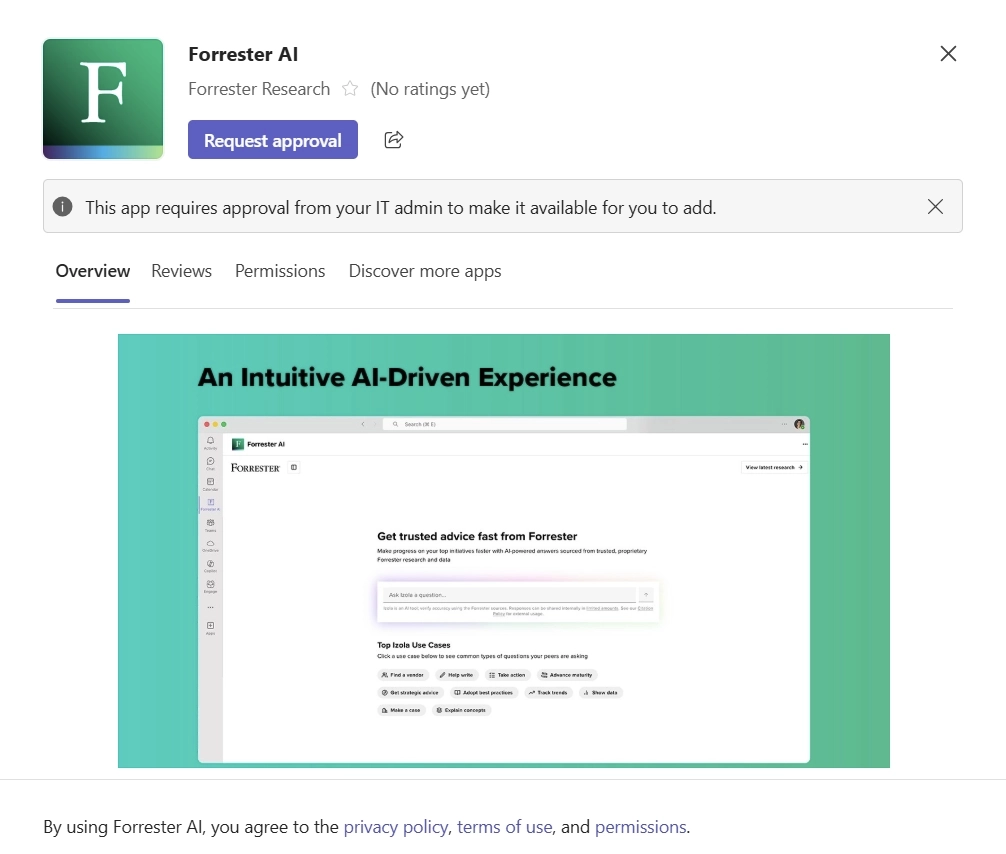
- Inside your Microsoft Teams application, go to the Apps tab (the “+” in the bottom-left corner).
- Search for “Forrester AI.”
- Click on “Forrester AI.”
- Click Add to install.
- If you see Request instead of Add, your IT team will need to approve the app for use. Click the Request button to send a request to your IT team. See IT Admin for more.
Login And Use Forrester AI
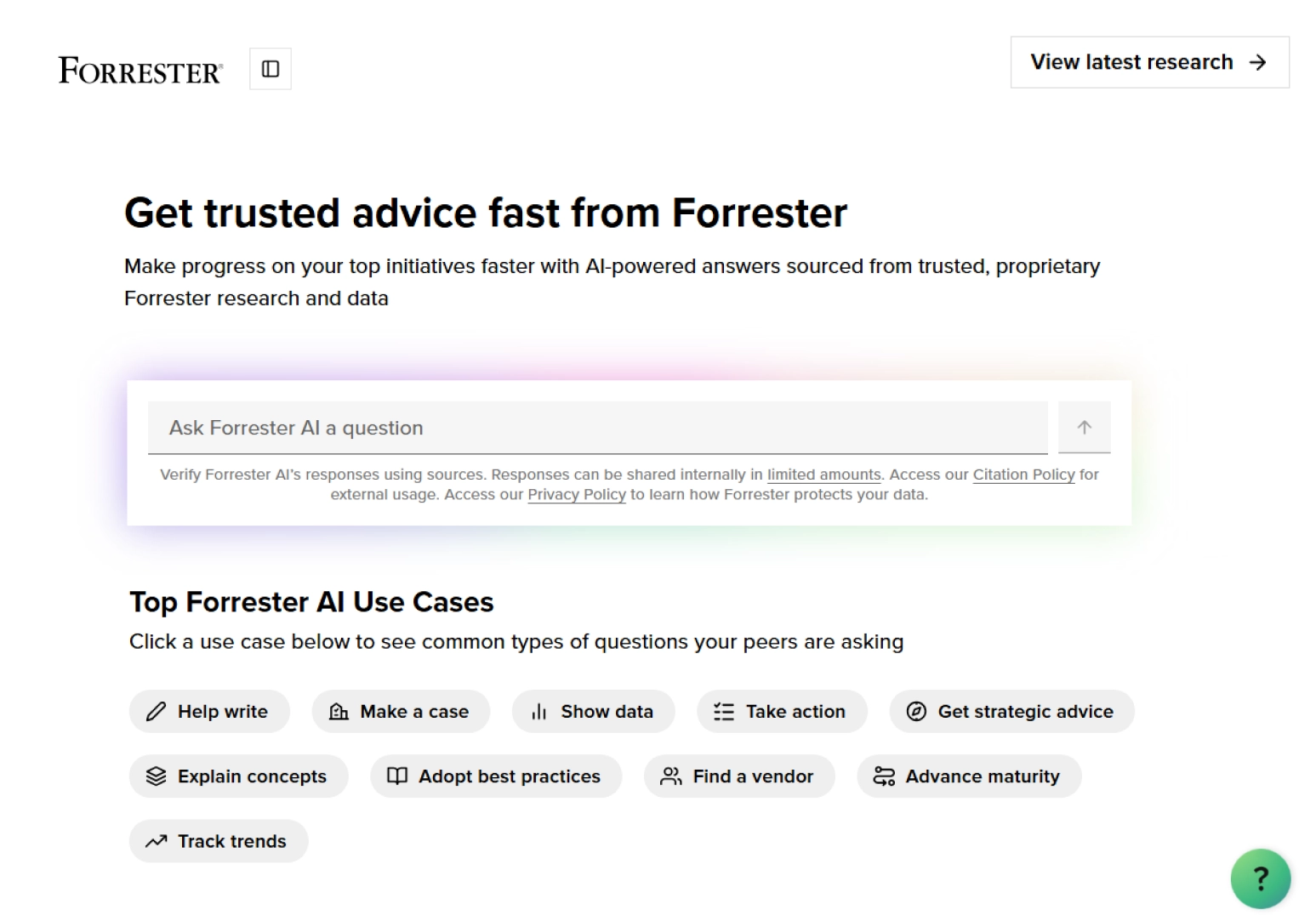
- To begin using the Forrester AI app, click on the Forrester AI icon in the left-hand sidebar.
- Login with your Forrester credentials.
- Begin to use Forrester AI by typing a prompt into the prompt box. We recommend you:
- Start by asking Forrester AI a question. Then, use the recommended ‘What To Ask Next’ questions to keep the conversation going. Take advantage of the use case examples, such as asking Forrester AI to find a vendor or help write a blog post.
- Dive deeper by reviewing and navigating to reports cited in the Forrester sources sidebar.
- For more on how other seatholders are making the most out of Forrester AI — Forrester AI Access.
Installation
Sign In To The Teams Admin Center And Approve The Forrester AI App
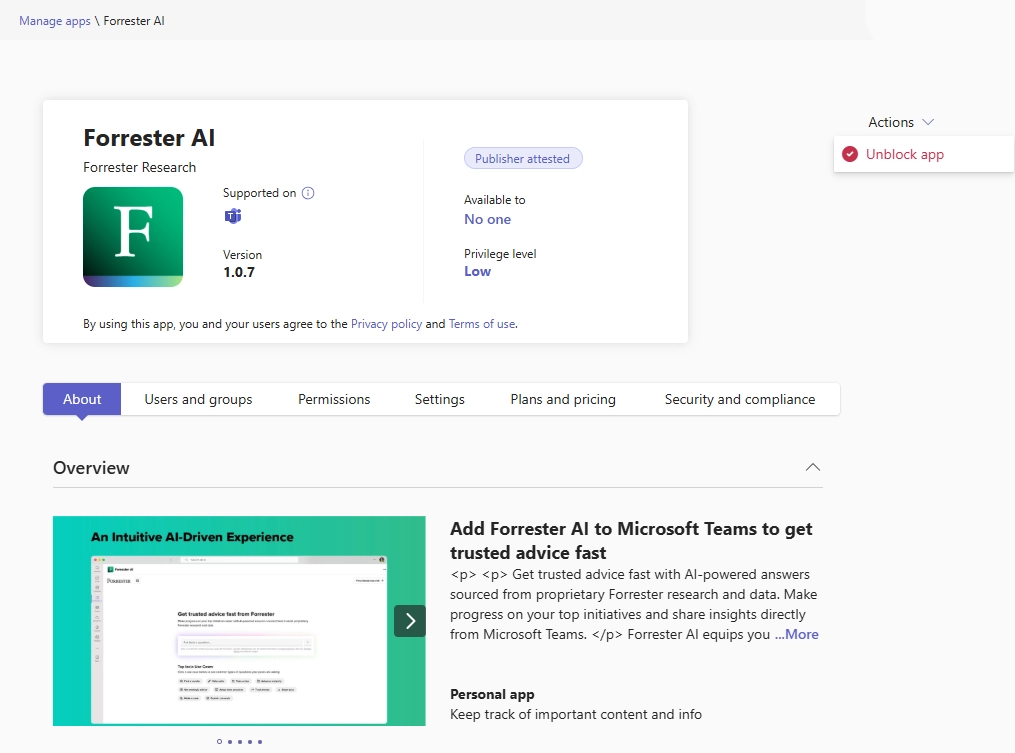
- Follow this direct link to the app or search for “Forrester AI” inside Apps –> Manage Apps.
- Select the app and select Actions –> Unblock App to enable it for your tenant.
- Pin it for all users (see Microsoft Permission Policies).
- To pin it only for current Forrester seatholders, reach out to your Forrester Account Manager for a list of users. See below for more information on how to pin.
Troubleshooting? Reach out to Forrester Client Support (clientsupport@forrester.com) for assistance.
Option A – App Setup Policy (Recommended)
Use this method to improve visibility and ensure the app appears for seatholders:
- In Teams Admin Center, go to: Teams apps –> Setup Policies.
- Create a new custom policy.
- Under Pinned Apps, add Forrester AI so it appears automatically for users.
- Assign this policy only to users in the Forrester seatholder group
Option B – App Permission Policy (Use for additional control)
Use this method to strictly control who can access or install the app:
- In Teams Admin Center, go to: Teams apps –> Permission Policies.
- Create a new custom policy.
- Assign this policy only to users who appear in the seatholder list provided by Forrester.
Recommendation:
For the best user experience, Forrester recommends enabling option A with option B to be used as a safeguard to prevent unauthorized access.
Validate Deployment
Once the app is approved and policies are applied:
- Seatholders should see Forrester AI available in the Teams app store.
- Seatholders can sign in with their individual Forrester credentials.
Note:
Users will always be required to sign into the app with their Forrester username and password the first time they open it. This is expected and ensures the app confirms their Forrester entitlements.
How Forrester AI Works
How does Forrester AI work?
Forrester developed Forrester AI in-house using open-source technologies and foundational LLMs that do not perform or require any training using user data. Forrester AI also uses a technique called retrieval-augmented generation to produce insights and advice using Forrester’s published research. When you submit a question, Forrester AI reviews the most relevant Forrester reports and blogs published since January 1, 2018, or content on analyst bio pages. Forrester AI sends this context to our LLM to generate a summarized response. You can review the top Forrester sources that Forrester AI utilized to generate its insights and advice.
Are Forrester AI responses influenced by my product, service, or level of access?
No. Forrester AI strives to produce the best insights and advice from all relevant Forrester reports and blogs published since 2018, regardless of the specific product(s), service(s), and level of service that you have. In other words, Forrester AI will not alter the insights and advice in the response or the “Top Forrester Sources” in any way based on your product, service, or level.
However, you may need to use a Courtesy View to fully view the reports in the “Top Forrester Sources” section that are published outside of your product, service, or level of access.
Are the responses generated from Forrester AI sourced solely from Forrester content?
The insight and advice in Forrester AI responses is based on Forrester reports and blogs published since January 1, 2018, and analyst bio pages. But given the nature of generative AI and use of an AI LLM, we always recommend that you verify any critical details of a Forrester AI answer using the Forrester source research listed below the answer.
Is it possible for Forrester AI to hallucinate?
Yes. Like all generative AI tools, Forrester AI has the potential to hallucinate and produce inaccurate answers or include content not based on Forrester’s research, blogs, or analyst bio pages. We recommend that you verify any critical details of a Forrester AI answer using the Forrester source research listed below the answer. If you suspect that your Forrester AI answer includes a hallucination, please tell us using the feedback mechanism described below.
What should I do if my Forrester AI answer is inaccurate or I suspect it includes a hallucination?
If you believe a Forrester AI answer is inaccurate, a hallucination, or includes content not based on Forrester’s research, blogs, or analyst bio pages, we encourage you to submit feedback using the “Is this answer helpful?” thumbs-up or thumbs-down rating feature at the top of the answer. This feedback will be routed to the Forrester AI team to further diagnose and address the issue.
Privacy And Sharing Policies
How does Forrester AI use my data and the questions I ask?
We will never sell or share any identifiable data you input into Forrester AI. See our Artificial Intelligence Policy and Privacy Policy for more detail on the type of personal data and ways we collect and use the personal data you provide. In order to ensure that Forrester AI provides accurate and useful answers to our users and to help service your account, we may internally review questions submitted via Forrester AI and Forrester AI’s answers. As with any AI or search tool, please do not insert sensitive, personal, or confidential information into Forrester AI.
Does Forrester train on my data?
Forrester does not train our model on Forrester AI inputs (the prompt submitted by a Forrester AI user) or Forrester AI outputs (the answer generated by Forrester AI in response to the Forrester AI user’s prompt). As mentioned above, relevant Forrester employees may review the questions submitted via Forrester AI and the answers generated to ensure that Forrester AI provides accurate and useful answers to our users and otherwise improve the quality of our products and services.
Can I cite and share the answers generated from Forrester AI in my internal or external presentations or otherwise share the responses with others?
Responses from Forrester AI are considered to be Forrester Works, similar to any other Forrester research content found on our site. Consistent with the terms of your contract and our Sharing Policy, licensed users may share up to a paragraph of text from a Forrester AI answer for their internal presentation purposes only. Answers from Forrester AI cannot be shared externally in any manner without our written consent. You can cite the underlying published research that Forrester AI displays as part of the answer. Please seek our written approval, which will be granted or denied in accordance with our Citation Policy.
Contact Us
For assistance with your Forrester client account, please contact your account manager or email clientsupport@forrester.com.